Getting started
Start the server, open the address it prints, and open an example.
What it needs
WEWoS runs with a Python 3 environment that has numpy. The Molecules library also needs MolKit2,
prody and mslib, which the ADCP distribution's adcpsuite environment provides;
bin/wewos finds that environment by itself ($WEWOS_PYTHON_ENV names
another one). To see what is missing:
bin/wewos check
The page needs a recent browser (Chrome, Firefox, Safari or Edge) with WebGL. It loads nothing from the internet: 3Dmol.js and Mol* come with WEWoS.
Start the server
bin/wewos serve
WEWoS 0.1.0 (Vision visual programming on the web) is at

    http://127.0.0.1:8767/?t=Xc3...

networks are kept in /home/you/wewos_runs
Open the printed address in a browser. The t= part is a token made at each start:
without it the server answers nothing, so other users of the machine cannot reach your
networks. Options:
| option | what it does |
|---|---|
--port 8767 | the port (0 picks a free one) |
--outdir ~/wewos_runs | where each network keeps its folder (also $WEWOS_OUTDIR) |
--host 127.0.0.1 | the address to listen on; keep the default unless you know why |
--base-path /wewos | also answer under this path, behind a proxy |
From another machine
To use a server running on another machine, forward its port through SSH, then open the printed address on your own machine:
ssh -N -L 8767:127.0.0.1:8767 you@server
Networks and their folders
Each open network has its own folder, under ~/wewos_runs/
(<name>_<date>-<time>_<id>). The files its nodes read and write
are relative to that folder, as they were to a network's directory in Vision. It also holds the
files you upload, the networks you save, and autosave.wnet.json, written after each
change.
File > New network opens a new, empty network. The menu at the top right lists the open networks and switches between them; they stay open on the server when you close the page, and come back when you open its address again.
Open an example
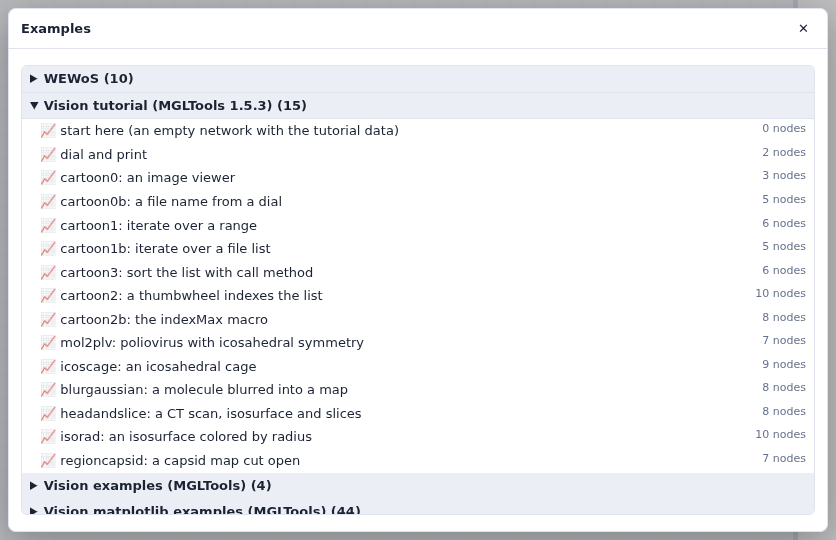
Clicking an example opens it as a new network, and copies the data files it reads into the network's folder. Press Run all to run it. The examples are good starting points:
| group | examples |
|---|---|
| WEWoS | crambin surface, helical crambin, icosahedral spheres, iterate squares, map isosurface, pick a residue, plots, poliovirus capsid (Mol*), spheres and a color map, viewer snapshot |
| Vision tutorial (MGLTools 1.5.3) | the networks of the tutorials, and an empty network that has the tutorial's data in its folder |
| Vision examples (MGLTools) | cpk, icos, image filters, and the network of figure 1 of the 2002 ViPEr paper |
| Vision matplotlib examples (MGLTools) | 44 plots: lines, scatter, histograms, bars, pies, polar, contours, spectra, quiver, tables, legends… |
Without the browser
bin/wewos run net.wnet.json                      # run a saved network
bin/wewos run net.wnet.json --set Dial.dial=3.5  # set a widget first
bin/wewos import old_net.py -o new.wnet.json     # convert a Vision network
bin/wewos test                                   # the test suite