An icosahedral cage
The cage of the icosahedral symmetry around the poliovirus capsid: vertices, edges and faces made by a macro and sized with a dial.
This is one of the more Vision networks of the tutorial. Open icoscage: an icosahedral cage from the group Vision tutorial and press Run all.
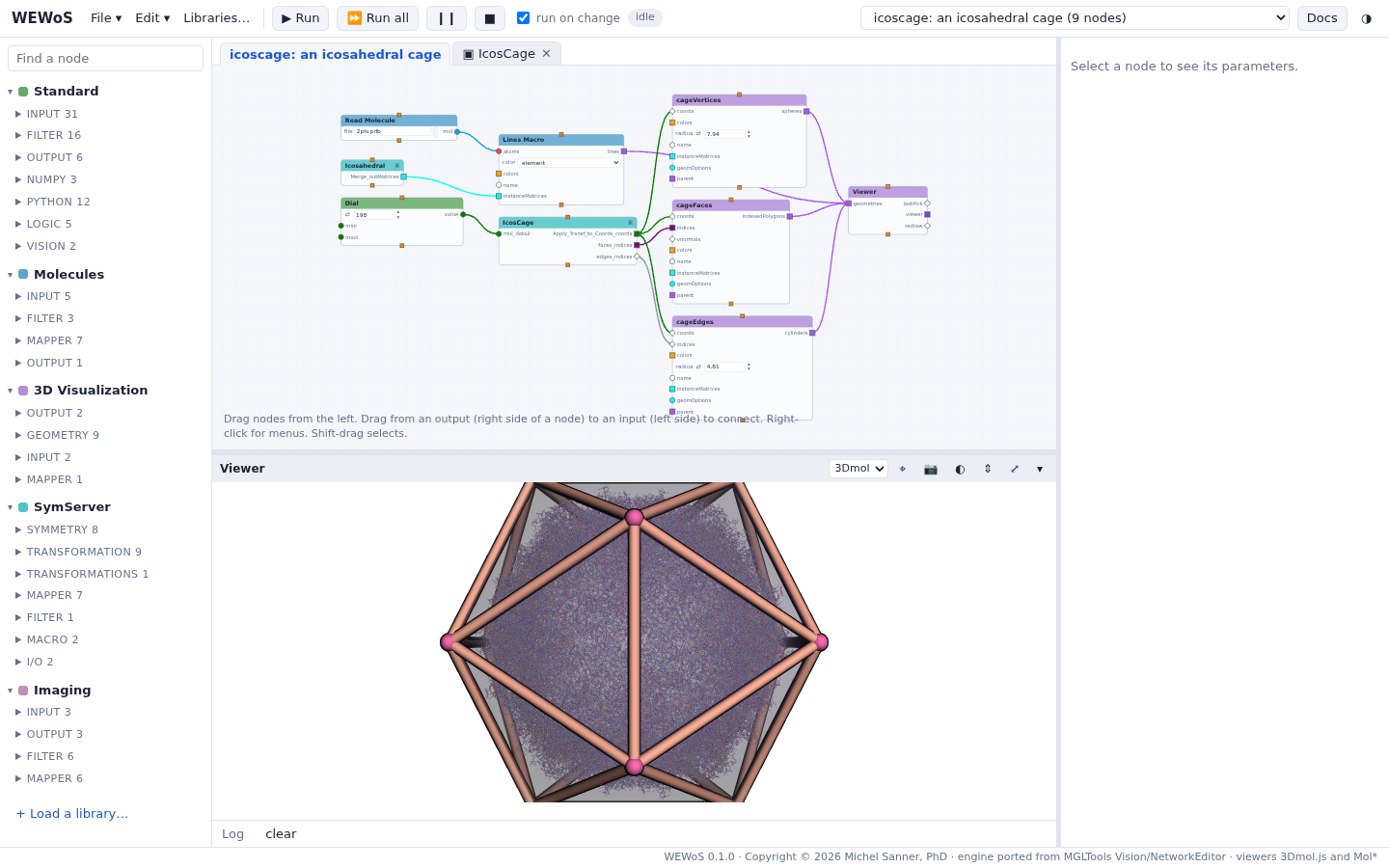
How it is built
- The capsid is the network of the previous tutorial
without the coloring: Read Molecule (
2plv.pdb) → Lines (all atoms, colored by element) → Viewer, with the 60 matrices of Icosahedral1 on Lines'instanceMatrices. - IcosCage (SymServer > Macro) computes an icosahedron of the size given to its input: the coordinates of its vertices, the triangles of its faces and the pairs of its edges.
- Three geometry nodes of 3D Visualization draw them from the same coordinates: Spheres (cageVertices), Cylinders (cageEdges, given the edges as indices) and IndPolygons (cageFaces, given the faces).
- A Dial sets the size: turn it to fit the cage around the capsid.
The colors of the cage come from the network file: Vision kept them in the viewer's saved state, and the importer gave them to the geometry nodes, which keep them with the network.
Try this
- Turn the Dial: the cage grows or shrinks, and the spheres and cylinders follow.
- Select cageVertices or cageEdges and change their radius; select cageFaces and change its opacity.
- Double-click IcosCage to see how it builds the icosahedron from its symmetry: one point on a 5-fold axis, scaled by the input, copied by the symmetry operators.
- Switch the viewer to Mol* (the menu in its header) for ambient occlusion and shadows (see The 3D viewer).