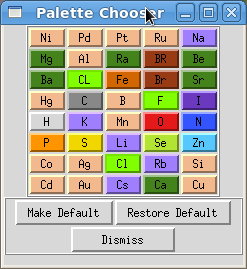
Color palette widget
Color palette widgets set the colors used for atoms, residues, chains or molecules. Open them through the Edit → Color Palettes menu; the screenshot below was made with Edit → Color Palettes → Edit Color by Atom Type.
Click a colored button to open the color chooser and change the default color. Geometries update as soon as you select a color, and the modified palette is used for the rest of the PMV session whenever you color molecules. To keep the modified palette for future sessions, click Make Default. Restore Default brings back the defaults shipped with PMV.